Back to Shop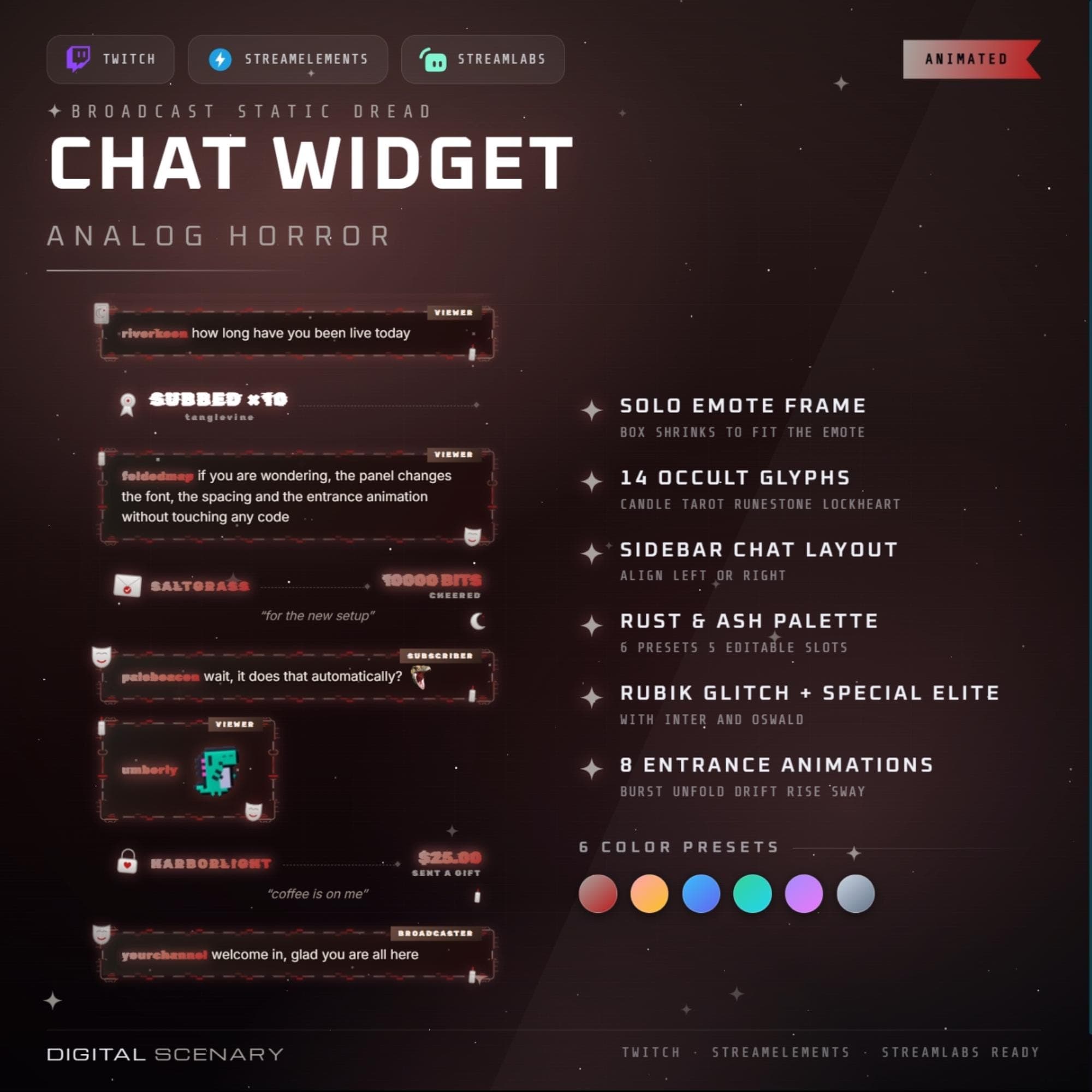 −16%
−16%
−16%Chatbox
Analog Horror Twitch Chat Widget - Static Glitch Overlay
$5.39$6.40 on Etsy
Buy more, save more2 items −10%3 items −15%5+ items −25%
Buying once gets you the files, forever. A membership gets you this widget plus the rest as hosted OBS links you edit from a dashboard. Compare them.
Instant download
Lifetime updates
Live in 60 seconds
Works With
StreamElementsStreamlabsOBS Browser Source
What's Inside
- Solo emote frame animation
- 14 occult-styled glyph icons
- Sidebar chat layout, left or right
- 6 rust-and-ash color presets
- 5 editable custom color slots
- 8 chat entrance animations
- Rubik Glitch and Special Elite fonts
twitch chat overlay · animated bubble · obs browser source · streamlabs widget · streamelements · vtuber decor · stream graphics · emote frame · youtube kick panel · vhs horror theme · glitch static art · creepy aesthetic · retro tv design
About This Pack
Analog Horror Twitch Chat Widget is an animated chat overlay with scanline flicker and warm tape distortion, made for found-footage and backrooms streams. Every message rides in through the noise like a transmission that almost didn't make it through clean.
Analog Horror Twitch Chat Widget is an animated bubble-style chat overlay for Twitch, YouTube and Kick built around a found-footage, backrooms visual theme. The pack includes 14 occult-styled glyph icons, candle, tarot, runestone and lockheart shapes among them, that mark subs, cheers, raids and other chat events as they scroll past. It ships with 6 rust-and-ash color presets and 5 editable color slots for anyone who wants to shift the palette without leaving the built-in editor. Messages arrive using one of 8 entrance animations, including burst, unfold, drift, rise and sway, and the layout can sit as a sidebar chat stack aligned to the left or right of your scene. A dedicated solo emote frame shrinks the message box to fit a single emote cleanly, and the display pairs Rubik Glitch and Special Elite headline type with Inter and Oswald for body text, so usernames stay legible under the static.
Setup takes a browser source and a couple of minutes. Drop the widget into OBS Studio, Streamlabs Desktop or StreamElements, paste in your Twitch channel name, and pick a color preset to match the rest of your scene. An illustrated PDF guide walks through every setting step by step.
Beyond color, the panel-level settings cover message limits, auto-hide timing and spacing, plus Twitch badge display for subs, mods and VIPs. Follows, subs, tips, cheers and raids can each be switched on or off, and the whole chat stack can sit flush left or right depending on your layout.
This one is built for channels leaning into found-footage horror, analog dread and backrooms lore, where a plain text box would break the mood. Once it's dropped in, the chat itself becomes part of the scene instead of sitting on top of it.