Back to Shop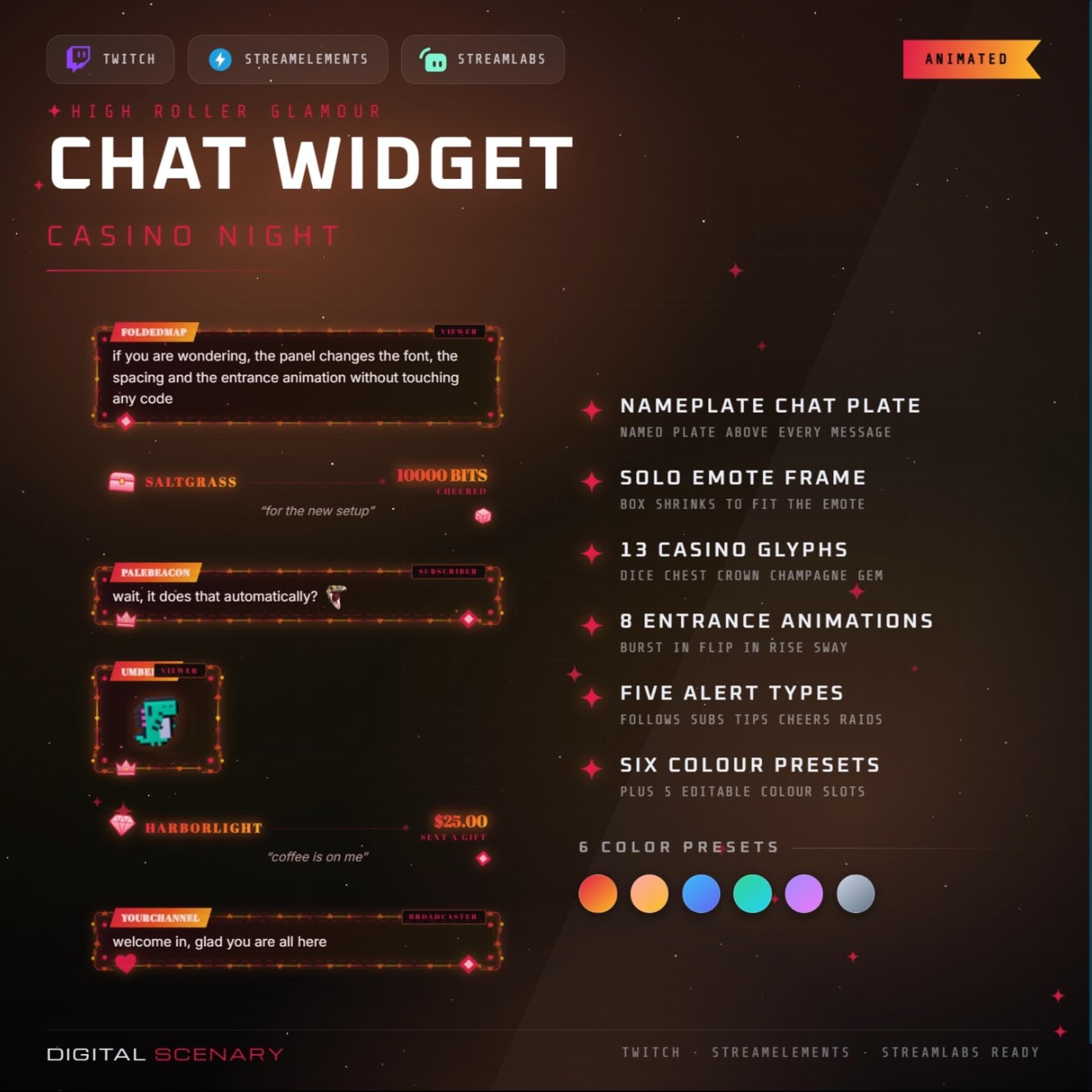 −16%
−16%
−16%Chatbox
Casino Night Animated Bubble Chat Widget — Twitch
$5.39$6.40 on Etsy
Buy more, save more2 items −10%3 items −15%5+ items −25%
Buying once gets you the files, forever. A membership gets you this widget plus the rest as hosted OBS links you edit from a dashboard. Compare them.
Instant download
Lifetime updates
Live in 60 seconds
Works With
StreamElementsStreamlabsOBS Browser Source
What's Inside
- Nameplate above every message
- Emote frame fits single emotes
- Thirteen illustrated casino glyphs
- Eight entrance animation styles
- Five in-chat alert types
- Six colour presets, custom slots
- OBS, Streamlabs and StreamElements ready
twitch chat overlay · animated bubble · obs browser source · streamlabs widget · streamelements · vtuber decor · stream graphics · emote frame · youtube kick panel · casino theme · poker card art · glamour aesthetic · vegas design
About This Pack
Casino Night is an animated bubble chat overlay for Twitch, YouTube and Kick wrapping every message in red felt, gold filigree and thirteen casino glyphs. Each message drops into its own glowing bubble with a named plate on top, so a scrolling chat reads like part of the tabletop scene instead of plain text stacked over gameplay.
Casino Night is a themed Twitch chat widget built around a red felt and gold filigree casino aesthetic. Thirteen illustrated glyphs — dice, treasure chests, crowns, champagne coupes and gems — sit scattered across the frame. Every chat bubble carries a nameplate above the message, so viewers can tell who is speaking at a glance. The emote frame shrinks to fit a single emote, so solo-emote messages never look stretched or cramped inside the box. The overlay ships with eight entrance animations, from a soft fade rise to a sharper flip in. Five alert types — follows, subs, tips, cheers and raids — surface inside the same chat stack instead of a separate popup. Six colour presets are built in, plus five editable colour slots for a fully custom palette. That range lets the widget match any other overlay already running on a channel's scene.
Setup takes about a minute. Unzip the download, then add it as a browser source in OBS Studio, Streamlabs Desktop or StreamElements. Paste in a Twitch channel name and pick a colour preset from the settings panel to get started. Typography pairs EB Garamond for messages with Cinzel for usernames, and both text size and weight stay adjustable if a channel runs a different font elsewhere. The ornament frame can be trimmed back to corners only or left running the full edge, and an illustrated PDF guide walks through every setting in the panel.
Every setting lives inside the same panel. Chat position, message spacing, how many messages stay on screen and whether Twitch badges show next to a name are all adjustable there. That single panel is what lets the widget match any layout without touching code, whether messages sit on the left edge of a scene or need more room to breathe.
This one is built for gambling-sim, poker and high-roller channels that want their chat to feel like part of the table, not a plain box floating over the scene. Drop it into a layout and pick a preset, and it already matches the rest of a casino-themed setup from the first message onward. Once purchased, the files are yours to use across every stream on Twitch, YouTube or Kick.