Back to Shop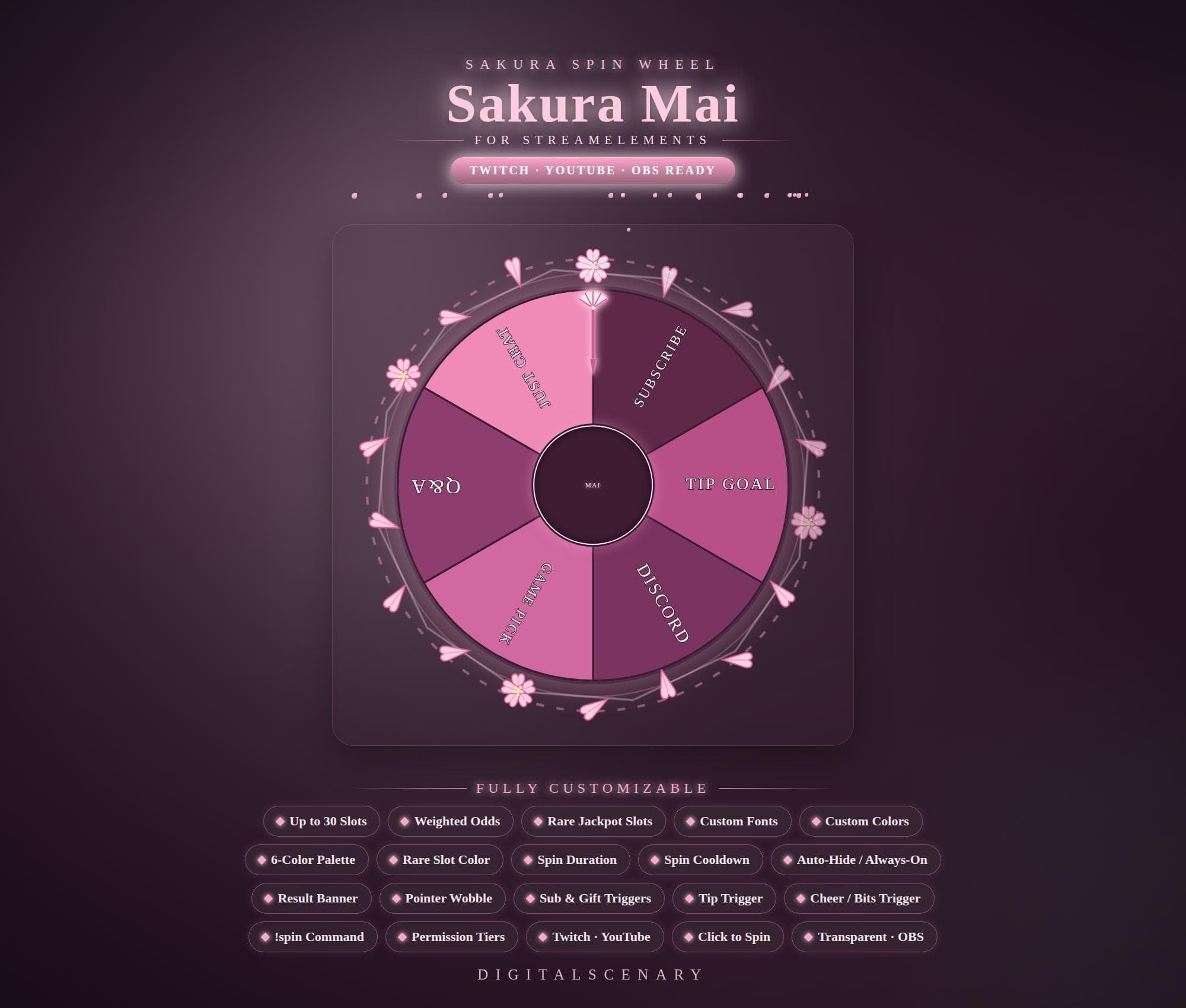 −16%
−16%
−16%Chart
Sakura Spin Wheel Overlay for Twitch & StreamElements
$5.69$6.80 on Etsy
Buy more, save more2 items −10%3 items −15%5+ items −25%
Buying once gets you the files, forever. A membership gets you this widget plus the rest as hosted OBS links you edit from a dashboard. Compare them.
Instant download
Lifetime updates
Live in 60 seconds
Works With
StreamElementsStreamlabsOBS Browser Source
What's Inside
- 30 customizable wheel slots
- 6-color segment palette
- Weighted odds & rare jackpot slots
- Spins on subs, tips, cheers
- !spin chat command with permission tiers
- Transparent background for OBS
- Result banner & pointer wobble
sakura spin wheel · twitch overlay fun · obs stream tool · youtube ready kit · customizable slots · interactive alerts · streamelements spin · live streamer asset · channel engagement · pink design element · weighted odds tool · digital overlay kit · chat trigger event
About This Pack
Sakura Spin Wheel StreamElements is an animated pink cherry-blossom wheel overlay that spins for subs, tips, and cheers on Twitch and YouTube streams. I built it around a soft blush-and-plum palette with drifting petals, so it feels like a little corner of a sakura garden landed on your scene. It drops into StreamElements as a ready-made widget — no design work needed on your end.
The Sakura Spin Wheel StreamElements overlay is a spin-the-wheel widget for Twitch and YouTube streams. It ships with six default segments: Just Chat, Subscribe, Tip Goal, Discord, Game Pick, and Q&A. A center badge sits in the middle of the wheel. You can expand it well beyond the defaults, up to 30 custom slots for your own prizes or choices. Every slot supports weighted odds, so rare jackpot slots land less often and glow in their own accent color. You control a 6-color segment palette, custom fonts, spin duration, and a cooldown timer between spins. The wheel triggers automatically on subs, gifted subs, tips, and cheers. It also spins on the !spin chat command, with permission tiers for who can use it. A result banner and a pointer wobble mark the winning slot. The whole overlay sits on a transparent background built for OBS and Streamlabs browser sources.
Setup happens inside the StreamElements Fields tab. Import the sakura-mai.zip file, type your Twitch channel name to enable the !spin command, and save it to your overlay — that's the whole install. From there you can rename any of the wheel's slots, add your own using the Label or Label|weight format, and set a rare weight threshold so certain outcomes stay special.
This one suits streamers who want their community to earn a moment on screen, not just watch a number climb. Set the wheel to fire off subs and tips so every new supporter gets a spin, or open it up with the !spin command during a Q&A or game night. Permission tiers let you decide whether that command is for everyone or just your subs and mods.
Everything here is yours to tune: colors, fonts, spin speed, cooldown, and the sakura palette itself. It's a one-time download you unzip and import, ready to sit on top of your scene the moment you save it.