Back to Shop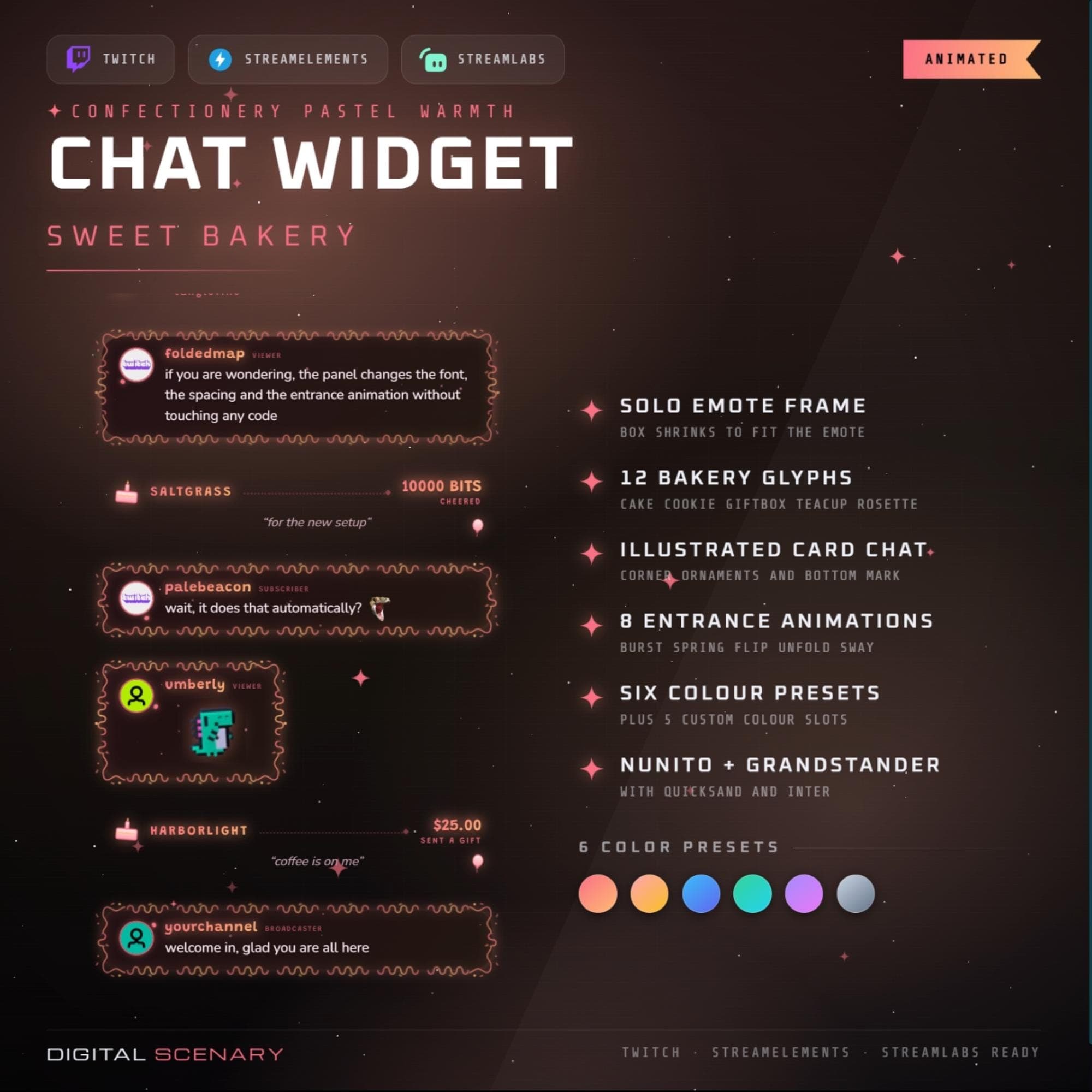 −16%
−16%
−16%Chatbox
Sweet Bakery Pastel Chat Widget - Animated Twitch Overlay
$5.39$6.40 on Etsy
Buy more, save more2 items −10%3 items −15%5+ items −25%
Buying once gets you the files, forever. A membership gets you this widget plus the rest as hosted OBS links you edit from a dashboard. Compare them.
Instant download
Lifetime updates
Live in 60 seconds
Works With
StreamElementsStreamlabsOBS Browser Source
What's Inside
- 12 bakery-themed message icons
- 8 entrance animations to choose from
- 6 color presets plus 5 custom slots
- Solo emote frame auto-resize
- Works with Twitch, Streamlabs, StreamElements
- Illustrated card chat with corner ornaments
- Nunito and Grandstander font pairing
animated chat box · twitch message ui · streamlabs widget · bakery theme kit · pastel overlay design · cozy chat bubble · custom message box · obs graphics set · confectionery style · sweet pastel decor · streamelements gfx · warm aesthetic vibes · cute twitch screen
About This Pack
The Sweet Bakery Pastel Chat Widget turns your Twitch chat into a cozy confectionery scene, complete with 12 bakery icons and 8 gentle entrance animations. Every message lands like a fresh treat pulled from the oven, wrapped in soft pastel color and warm, hand-drawn detail.
Sweet Bakery Pastel Chat Widget is an animated chat overlay for Twitch, Streamlabs, and StreamElements that gives every viewer message a cozy, bakery-themed card. It ships with 12 bakery glyphs — cake, cookie, giftbox, teacup, rosette, and more — that appear next to alerts and messages for extra charm. Choose from 8 entrance animations, including burst, spring, flip, unfold, and sway, to control how new chat bubbles arrive on screen. 6 color presets cover warm orange, sunny yellow, light blue, mint green, lavender, and soft grey, with 5 custom color slots for matching the palette to your own brand. Each message card carries illustrated corner ornaments and a bottom mark for a hand-drawn, premium feel. Nunito and Grandstander fonts, backed by Quicksand and Inter, keep every message clean and easy to read. When a viewer sends a single emote, the box automatically shrinks to frame it.
Setup takes about a minute: paste the browser source link into OBS, Streamlabs, or StreamElements, then add your Twitch channel name inside the widget settings. From there you can adjust chat position, message spacing, and how long each message stays on screen. Follows, subs, cheers, tips, and raids can each be toggled on or off inside the same panel.
Every color, from the panel gradient to the icon highlight, is yours to change without touching code. That means the widget can shift from a warm bakery glow to your own signature palette in minutes. It suits cozy gaming streams, baking or crafting content, and any channel that wants chat to feel like a small, welcoming table rather than a plain box.
I designed this set to feel like a warm kitchen corner on your stream, not just another overlay pack. Drop it into your scene, pick a palette, and it's ready to welcome your community in.